Thursday, 14 January 2016

P5 Certification Classification Based on Feedback
Certification Classification Based on Feedback
Using the data collected by my survey I can analyse the results and determine what age certification my production should receive. When I created this survey I based the questions on the factors that the BBFC would use to judge my film. As my production has no discrimination, drugs or sex in it I did not waste questions that covered these topics as they do not appear, instead I focussed my questions around threatening and violent content within the film, as I wanted to know if people thought it would be unsuitable for those below twelve, as this would allow the film to gain a PG certificate, thus widening the target audience.

This result shows that the majority of people think that the film shows a moderate amount of threatening behaviour. The BBFC states that for a PG film 'frightening sequences or situations where characters are in danger should not be prolonged or intense'. This is an issue because the characters in Hidden are clearly under threat for a long period of time, however I would consider this level of threat to be quite low, which may excuse this factor.

The data from this question suggests that most audience members found there was a very low level of violent content, thus they deem it appropriate for audiences under 12. BBFC guidelines state that Violence will usually be mild. However there may be moderate violence, without detail, if justified by its context. Therefore these results would seem to suggest that this film meets the requirements of a PG.

This result is interesting as it suggests that audiences do think the film shows moderate physical and psychological threat, which may mean the BBFC would classify this film as a 12 as 12 rated films are allowed 'moderate physical and psychological threat and horror sequences.'

This result even suggests that the film should be rated 15 as sustained horror sequences are not allowed in 12 rated films.

This is the most important question in the survey as it shows what age rating audiences feel this film should be given. This result shows that most people think this film could pass as a PG rated film with 50% of the vote, while another 40% felt that a 12 rating would be most appropriate. These decisions will have been made based on the amount of threatening and violent behaviour seen in this production. From these results I would suggest that this film receives a 12 rating due to the sustained horror sequence and overall feel of the film.
Letter to the BBFC

Final Certification:
Films classified 12A and video works classified 12 contain material that is not generally suitable for children aged under 12. No one younger than 12 may see a 12A film in a cinema unless accompanied by an adult.

P4 Focus Group Screening & Feedback
Meaning and Purpose
Focus Group Screening
The BBFC was created by the film industry in 1912. It wanted to make sure that all of its films, were checked on behalf of the whole country. After video was released in 1984, the government passed the Video Recordings Act 1984, this placed the BBFC in charge of classifying all videos for home use. The law wanted to ensure that film works were classified for the appropriate audiences, so to ensure that they were not harmful to people and in particular young children. This means that before a film is released they must be reviewed by the BBFC, examiners will then look for content such as violence, drug abuse, discrimination etc and determine what certificate is suitable for the film based upon the quantity and detail of those factors.
Focus Group Screening
Focus group screenings are formal test screenings of a film with very detailed documentation of audience responses. Target audience members answer survey questionnaires and are sometimes interviewed on video, in this case we decided to hold a group discussion after the film with 6 viewers and captured their reaction based on the productions quality e.g cinematography, audio etc..
Focus Group Certification Feedback:
Summary of Discussion:
We also consulted a focus group that spoke to us about what age certificate they felt the film should be awarded based on the films content, theme, genre. This conversation was primarily based around the threatening and violent behaviour seen in the film and went into detail with regards to these factors, as they would have the most impact on how the film would be judged by the BBFC.
The members of this focus group concluded that due to the theme and genre/overall nature of the film it would be unsuitable for younger audiences under the age of 12. They justified this decision by saying that certain scenes implied death and some even showed dead characters, which would be scary for children, they also felt that throughout the film there was a intense feeling that had a psychological impact on the audience.
Survey:
In order to collect a broad spectrum of results that cover all target audiences in terms of gender and age group I have sent out an online google forms survey and distributed it via email, this system will collect my results and present them via detailed graphs that I can use to analyse my feedback. I have this survey around the classification system used by the BBFC to determine what rating this film would receive based on audience opinion.


BBFC Guidelines
Before release the BBFC has examiners watch the films and videos all the way through and provide an age rating for the title. They reach an age rating by applying the standards and criteria that are defined in their Classification Guidelines. This criteria is rates films based on the following factors:
Context
Theme
Tone and Impact
Drugs
Discrimination
Easily Imitable behaviour
Language
Sex
Threat
Once an examiner has watched the movie there are 7 types of age ratings that the film can be awarded these are U, PG, 12, 12A, 15, 18 and 18R all of which are explained below:
U Universal – Suitable for all

A U film should be suitable for audiences aged four years and over, although it is impossible to predict what might upset any particular child. U films should be set within a positive framework and should offer reassuring counterbalances to any violence, threat or horror.
PG Parental Guidance – General viewing, but some scenes may be unsuitable for young children

A PG film should not unsettle a child aged around eight or older. Unaccompanied children of any age may watch, but parents are advised to consider whether the content may upset younger, or more sensitive, children.
Threat: Frightening sequences or situations where characters are in danger should not be prolonged or intense. Fantasy settings may be a mitigating factor.
Violence: Violence will usually be mild. However there may be moderate violence, without detail, if justified by its context (for example, history, comedy or fantasy)
Films classified 12A and video works classified 12 contain material that is not generally suitable for children aged under 12.
No one younger than 12 may see a 12A film in a cinema unless accompanied by an adult. Adults planning to take a child under 12 to view a 12A film should consider whether the film is suitable for that child.
Threat: There may be moderate physical and psychological threat and horror sequences. Although some scenes may be disturbing, the overall tone should not be. Horror sequences should not be frequent or sustained.
Violence: There may be moderate violence but it should not dwell on detail. There should be no emphasis on injuries or blood, but occasional gory moments may be permitted if justified by the context. Sexual violence may only be implied or briefly and discreetly indicated, and its depiction must be justified by context.
15 – Suitable only for 15 years and over
No one younger than 15 may see a 15 film in a cinema. No one younger than 15 may rent or buy a 15 rated video work.

Threat: There may be strong threat and horror. A sustained
focus on sadistic or sexual threat is unlikely to
be acceptable.
Violence: Violence may be strong but should not dwell on the
infliction of pain or injury. The strongest gory images
are unlikely to be acceptable. Strong sadistic violence
is also unlikely to be acceptable.
There may be detailed verbal references to sexual
violence but the depiction of sexual violence must be
discreet and justified by context.
18 – Suitable only for adults
No one younger than 18 may see an
18 film in a cinema.
No one younger
than 18 may rent or buy an 18 rated
video work.
Adults should be free to choose their own
entertainment.

P3(d) Linking Audio to Visuals and Applying Audio Effects
Linking Audio to Visuals and Applying Audio Effects
When you drag footage into the timeline in Premiere Pro the audio is automatically linked with that footage. However in some cases we had to add extra audio clips e.g Music tracks, to do this we dragged the music to an audio channel below the footage and lined it up with the correct clip. In some instances we had to cut the music before it ended which caused it to stop abruptly and ruin the immersion.

To solve this we used the audio effect 'volume' to gradually reduce the clips volume by key framing the audio levels adjustment.

Editing Music

Ambient Sounds
During the scenes in the woods ambient forest sounds were used to build up suspense, but also to inform the viewer of where the film was set and fully immerse them in that environment.
P3(c) Applying Visual Effects and Transitions
Applying Visual Effects
Text Overlays:
To introduce the name of our production we decided to create a text layer by going to title>new title>default still as shown below.

This brought up the 'title' window that allowed us to type and edit the text in numerous ways so to fit the theme of the video.

We made the following changes;
- Changed the font to look more creepy, which related to the videos themes.
- Made the text larger.
- Positioned it in the lower right corner of the frame, so to not obscure the view of the actors in the frame.
Once we had finalised the edits to the text we dragged the text layer into Video 2 layer which laid it over the footage on Video 1.

Affect of audience:
Text is often used to inform the audience, in this case I'm informing them of the title of the movie, however text can be used to inform the audience of a date or location and is also seen in the credits of a film.
Transitions:
As seen above we also used transitions in our production, in this case we used a cross dissolve transition on the text layer that made it fade in and out, for a more smooth feel that does not distract the audience.
 |
| This effects automatically adjusts the layers opacity over a period of time that is set by the editor. |

 |
| This is a visual demonstration of the opacity changing its value from 0 (invisible) to 100 (Sold) |
Affect on audiences: Transitions help to make an edit 'invisible' in this case the transition has made the text disappear smoothly as opposed to just disappearing, which may distract the audience, transitions help visual elements to move and visually appealing ways.
Colour Correction:
The final Visual effect I applied to the production was a colour correction, using the Effects window I found the RGB curves effect and dragged it onto the clips I wanted to apply it to.

RGB curves allows the editor to adjust the shadows, mid tones and highlights of a shots colour channels (Red, Green and Blue) as shown below.


 |
| The shot before RGB curves |
The image below shows how I have adjusted each colour channel.
Summary of adjustments:
- Reduced Red highlights
- Boosted Blue highlights
- Boosted Green shadows

Affect on audiences:
The effect this creates is a shot that appears more blue and green with very little red, giving a colder and darker look that matched with the theme of the film. During the editing stage I spent a lot of time creating the colour palette that fit the story of the film. The colour of the film is vital as it controls meaning, what the story is about and its thematic underpinning. Therefore the look of the film will often be based on those factors. In this instance the colour palette is based upon the setting, content of the film and genre of the film and as this is a horror film set in a forest location I decided that a green/blue tint would convey the most suitable message/feeling.
 |
| After RGB curves has been applied and its parameters changed. |
Working Process:


P3(b) Producing and Reviewing an Off Line Edit
Producing and Reviewing an Off Line Edit
A film editor must creatively work with the layers of images, story, dialogue, music, pacing, as well as the actors' performances to effectively "re-imagine" and even rewrite the film.
Offline editing is part of the post-production process of filmmaking and television production in which raw footage is copied and edited, without affecting the camera original film stock or video tape. Once we had finished logging our rushes we had to produce an offline edit, this involved dragging all of our footage into the timeline in the correct order and cutting them down the correct length, this gave us more insight into how long the film was going to be and if we needed to add more footage or remove more.
 |
| This is a view of the timeline editor with the final offline edit. |
Creating meaning through editing:
One of the core purposes for editing a film is to express a story and create meaning using just the raw footage that an editor is provided with. Editors can use colour, pace, different types of shots and visual tricks e.g CGI to give a film a meaning. However during the offline edit I could only choose which shots to place in the timeline and also when to cut them so to influence the pace of the film. I felt that I should refer back to my storyboard to make my editing decisions but also for a reference for when I made changes to the edit that were not originally planned for.
Example of how I created meaning in the timeline:
During the beginning of the film most shots last for longer periods of time and are shot from further away using smaller focal lengths, I felt that this would help introduce the audience to the location, allowing them to become immersed in the environment and give them a feel for the atmosphere I was attempting to create.
Once the story developed I had to find a way to release all the tension that had built up in the beginning scenes, to do this I decided to make cuts become faster and increasingly dramatic so to put the audience on edge, as shown below
Reference to Storyboard:
One of the core purposes for editing a film is to express a story and create meaning using just the raw footage that an editor is provided with. Editors can use colour, pace, different types of shots and visual tricks e.g CGI to give a film a meaning. However during the offline edit I could only choose which shots to place in the timeline and also when to cut them so to influence the pace of the film. I felt that I should refer back to my storyboard to make my editing decisions but also for a reference for when I made changes to the edit that were not originally planned for.
Example of how I created meaning in the timeline:
During the beginning of the film most shots last for longer periods of time and are shot from further away using smaller focal lengths, I felt that this would help introduce the audience to the location, allowing them to become immersed in the environment and give them a feel for the atmosphere I was attempting to create.
 |
| A close up of the timeline that shows how the beginning clips were longer, to build tension. |
 |
| Later in the timeline the cuts become shorter. |
Reference to Storyboard:
When editing its important to reference back to the storyboard to ensure that the shots are in the correct sequence, so that the original idea corresponds with the final outcome and matches the original meaning. It also means that you can illustrate what changes were made in the post production stage.


P3(a) Logging Rushes and Creating Edit Decision List
Meaning and Purpose:
When editing a film its important for editors to be highly organised, as it will mean they can work faster whilst also reducing the chance of them forgetting where they saved files, saving time. This means that editors must set up a project folder from which all materials that relate to the project are saved in e.g Premiere Pro save file, RAW footage and any other additional materials such as audio and images. There is also technical reason for this as well and this is because its easier for Premiere Pro to find the RAW footage if it's placed in one area.
Logging Rushes:
 |
| This image shows me renaming my footage to correspond with my edit decision list. |
Prior to the editing stage loggers must watch through all the footage taken on the day of the shoot and select the footage that will be used in the offline edit, they record the best clips metadata and this information is then passed onto the editor, this makes the editing process far more efficient. It's also important to rename rushes so that the video clips are in the correct order, this is so that when the footage is dragged in to the premiere pro timeline it is all in the correct order, reducing the time spent having to move clips in one by one, making the editing process far more effective.
Setting up the Project folder:
In order to setup the project folder I decided to create a folder on the desktop that would be easy to access. For this production we decided to log our rushes using OSX's finder, this allowed us to organise our footage in the order of which it was taken, we then watched through the clips and removed those that were no good, and renamed the remaining clips to correspond with our edit decisions list, once this was completed the footage was imported into Premiere Pro.
 |
| Using finder I created a new folder on my desktop |
 |
| Once I had created the parent folder I created sub folders within that where I could place my footage, project and audio files. |
Setting up the Premiere Pro Project:
 |
| This is the new project window in Premiere Pro, from this window I chose to select 'new project' |
 |
| In the 'new project' window I then had to chose the file location where I would save my project, I chose to select the Hidden project folder I had created on the desktop. I also set the capture format to HDV as we shot our footage in HDV. I then finished this step by naming the project. |
 |
| Here I created and setup the main sequence in my project, I decided to choose a HDV 1080p 24fps preset as it matched my camera settings. |
Edit Decision List
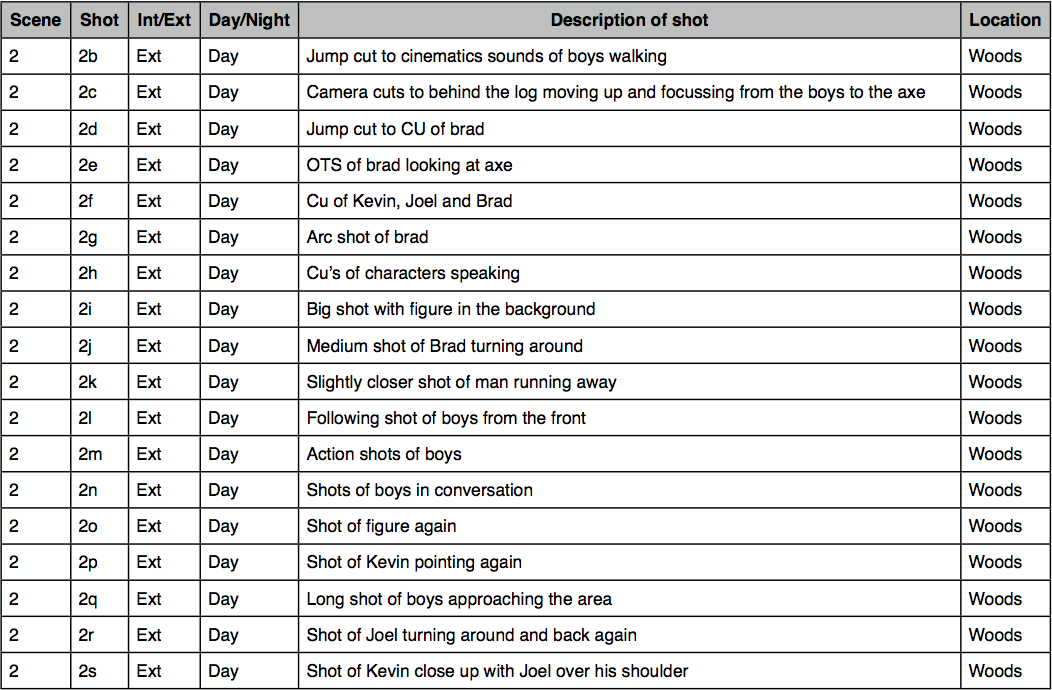
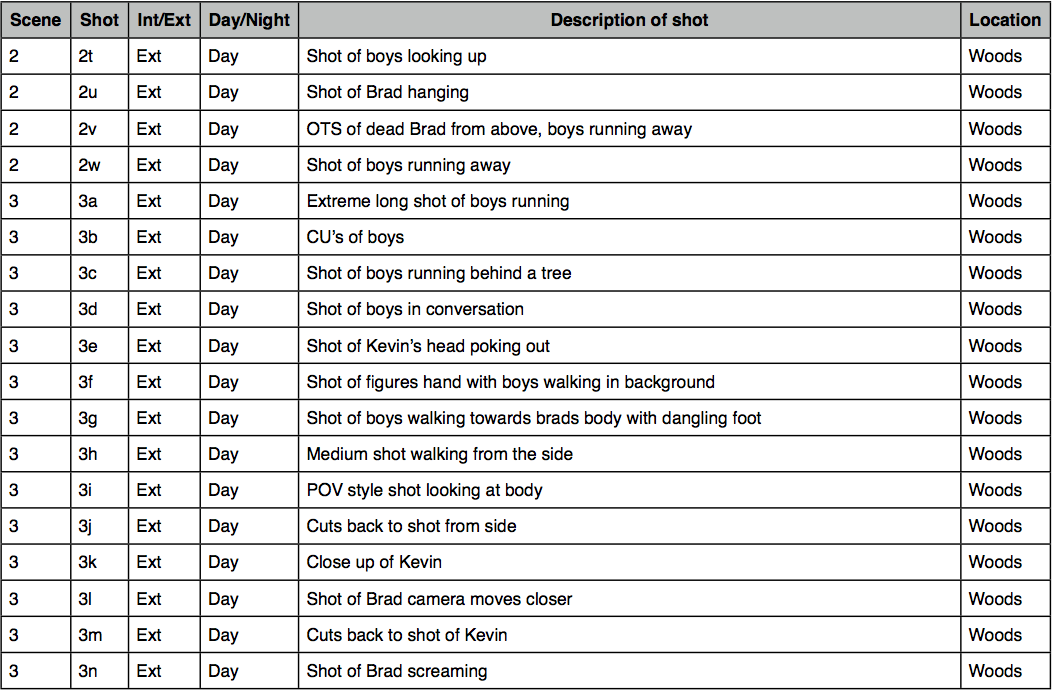
An edit decision list or EDL is used in the post-production process of film editing and video editing. The list contains an ordered list of reel and timecode data representing where each video clip can be obtained in order to conform the final cut.


Subscribe to:
Comments (Atom)